Get Accurate Transcripts
from YouTube in Seconds
Extract searchable transcripts from public YouTube videos that have captions. Export from our Web App or integrate via API.
Built for creators, developers, and agencies
Start with the free tool, then go deeper
Pick the path that matches how you work: web app, REST API, MCP, pricing, or support.
Free YouTube transcript tool
Paste a public YouTube URL, then search your library and download TXT, JSON, or SRT.
Get started free How export and search workYouTube Transcript API
REST endpoints, API keys, and rate limits for scripts, apps, and webhook automations.
Read the API docsMCP server
Connect Claude, Cursor, and other MCP clients to fetch YouTube transcripts in chat.
View MCP setupPricing
Start free with 15 credits a month, then upgrade when you need more volume or faster limits.
Compare plansSupport & use cases
See how teams use transcripts day to day, or get help with billing, failed videos, and setup.
Browse supportTurn YouTube Videos into Searchable Text
Stop manually transcribing. Get accurate transcripts with timestamps and export them in the format you need.
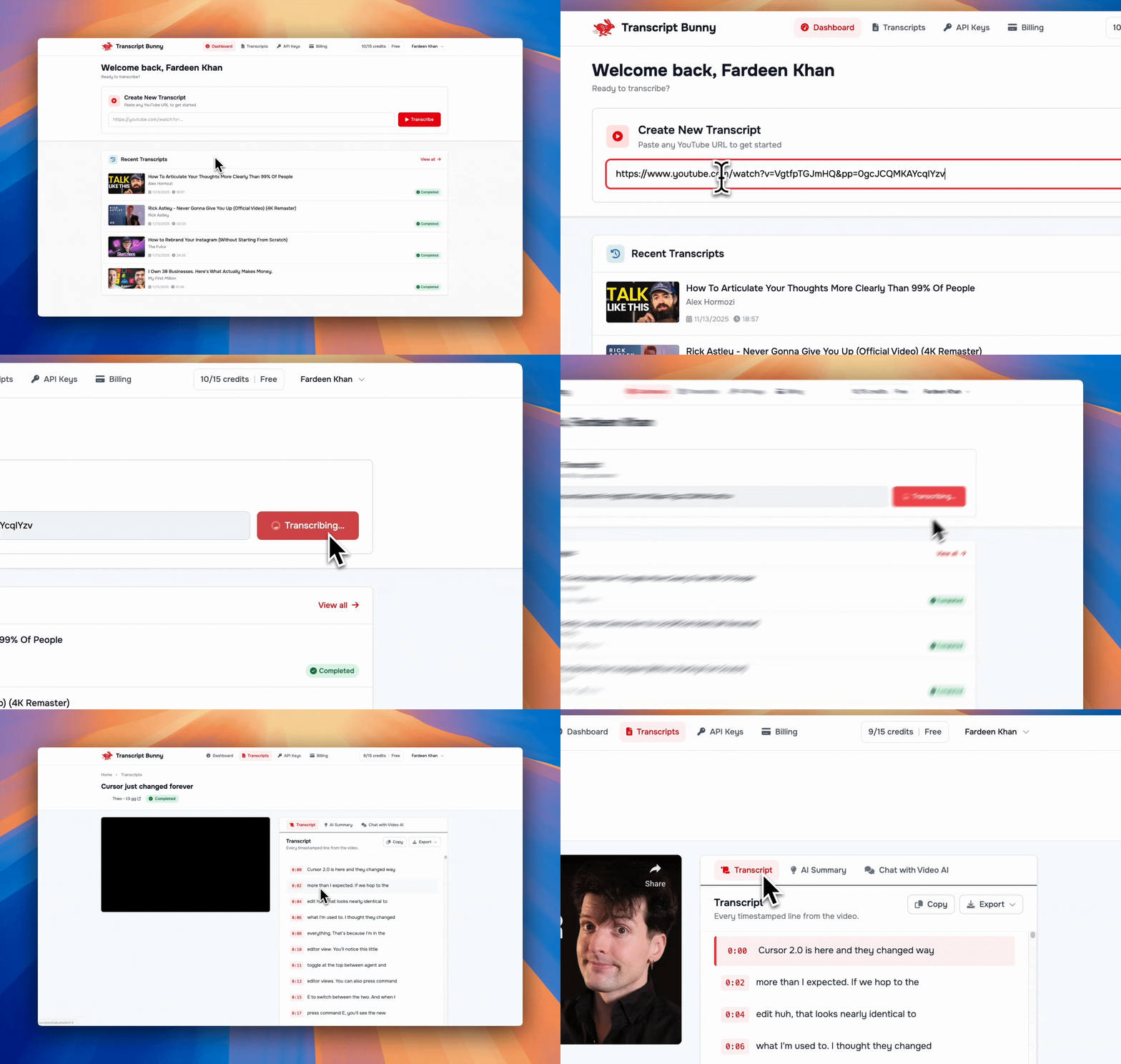
Get Transcripts in Seconds
Get accurate transcripts in seconds. Copy, download as TXT/SRT, or jump to any moment with clickable timestamps.
See how export and search workTranscript API
Build transcript workflows. Fetch timestamped YouTube transcripts as JSON from scripts, apps, and automations.
Read the API guideThe YouTube Transcript API
Stop scraping and start building. Our API handles the complexity of extracting transcripts, so you can focus on your product.
- Public videos that have captions
- Structured JSON output with timestamps
- Rate limits from 5 to 200 requests/minute by plan
- Easy integration with Python, JS, cURL
  import requests

  url = "https://transcriptbunny.com/api/v1/transcribe"
  headers = {
      "Authorization": "Bearer tb_live_..."
  }
  payload = {
      "videoUrl": "https://www.youtube.com/watch?v=dQw4w9WgXcQ"
  }

  response = requests.post(url, headers=headers, json=payload)
  data = response.json()

  # Get full text
  print(data["transcript"]["text"])

  # Get segments with timestamps
  for segment in data["transcript"]["segments"]:
      print(f"[{segment['timestamp']}] {segment['text']}")
Get YouTube Transcripts in Claude, Cursor & More
Our MCP server lets AI assistants fetch YouTube transcripts directly. Ask Claude or Cursor to grab any video transcript, summarize it, or extract quotes-all in natural language.
- YouTube transcripts in Claude Desktop
- YouTube transcripts in Cursor IDE
- Works with any MCP-compatible AI client
- Same credits, same API key
Claude Desktop
Fetch YouTube transcripts via Claude
Cursor IDE
YouTube transcripts in your editor
Any MCP Client
Streamable HTTP MCP transport
"Get the transcript for youtube.com/watch?v=... and summarize the key points"
Automate Your Entire Workflow
From research to production, call the YouTube Transcript API from Zapier, Make, n8n, or any HTTP webhook.
Marketers
Repurpose content at scale. Analyze competitors and turn videos into blog posts.
See use casesContent Creators
Generate subtitles, show notes, and social clips from long-form videos in minutes.
Export TXT, JSON, or SRTResearchers
Search hours in seconds. Find exact quotes and data from lectures or interviews.
How library search worksDevelopers
Build transcript-powered apps. Feed timestamped video text into search, indexing, or publishing tools.
Open the API docs
Frequently Asked Questions
Is it free to use?
Yes! You can get started for free with 15 credits (transcripts) per month. No credit card required. See plans and pricing when you need more volume.
Can I use the API?
Absolutely. Our API is designed for developers and automation. It's available on every plan, including Free, with higher rate limits on paid plans. Read the YouTube Transcript API docs.
Does it work with any YouTube video?
It works with public YouTube videos that have captions or subtitles (auto-generated or uploaded). Transcript Bunny returns the default caption track available for that video. The transcript language follows those captions. There is no language picker, and we do not translate captions. If a video fails, see support.
Can I export transcripts?
Yes. You can search your library and export completed transcripts as TXT, JSON, or SRT.
Does it work with Claude or Cursor?
Yes! We support the Model Context Protocol (MCP), so you can connect Transcript Bunny to Claude Desktop, Cursor IDE, and other AI tools. Read the MCP server guide →
Start Transcribing Today
Start free with 15 credits/month. No credit card required.
Get Started for FreeNo credit card required • Cancel anytime